


VirtuNum - Virtual Number
4.420.96K Reviews
App Specs
- Version
- 1.6.9
- Updated On
- License
- Free
- Downloads
- 5,000,000+
- Developer
- Morteza Salmanpour
- Categories
- Communication
- Platform
- Android, iOS
Screenshots
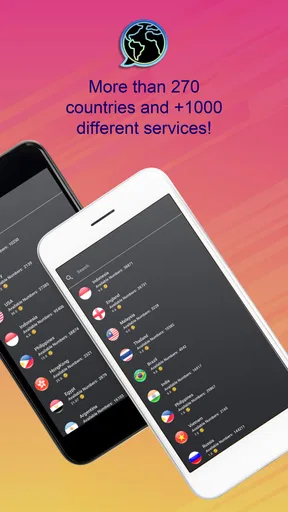
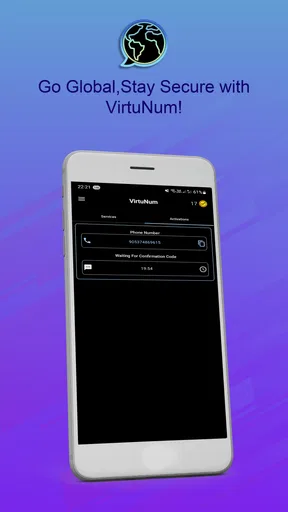
 Analysis by AppCompare
When a website asks for a text code, I want to know whether using a separate number will make the process simpler—or just add another thing to manage. VirtuNum - Virtual Number is a communication app from Morteza Salmanpour built around virtual numbers and SMS verification. Its focus is useful for people who want some distance between an online account and their everyday number, but that convenience comes with practical trade-offs: a code still has to arrive, and a second number is only helpful if the service you’re using accepts it.
Who benefits from a separate number
I’d consider VirtuNum if I regularly sign up for services, manage separate work and personal communications, or need a number for a particular online task without handing out my main one. For instance, a freelancer might want to keep a client-facing contact separate from family calls, while someone testing a new service may prefer not to use their everyday number immediately. Those are different needs, though: a temporary verification task is not the same as maintaining a dependable second line for ongoing conversations.
For verification, the sensible approach is to check whether the service accepts virtual numbers before relying on one. Some platforms may reject numbers they identify as virtual, and a code can fail to arrive for reasons outside the app’s control. I would not make a virtual number the sole recovery route for an important account unless I had first confirmed that the number works there and understood how I could regain access later.
A verification workflow that avoids surprises
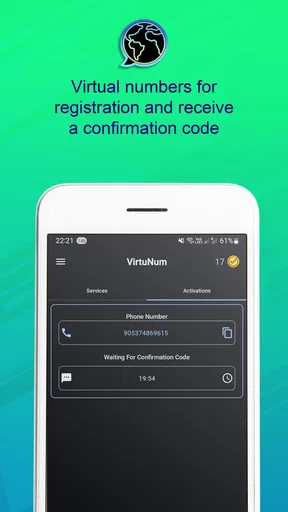
For a low-stakes signup, I’d first open the destination service and see which phone-number formats it accepts. Then I’d choose a suitable number in VirtuNum, enter it carefully, and wait for the code in the app rather than repeatedly requesting new codes. If the first attempt stalls, I’d check the country selection and the destination’s instructions before trying again; rapid repeat requests can create confusion or trigger limits on the service asking for verification.
That workflow is less about clever settings and more about keeping the two apps straight. I’d copy the number rather than relying on memory, return to the verification screen promptly, and avoid closing the account setup until I know whether the code arrived. For a service I intend to keep using, I’d also record which number I used in a secure place. Months later, remembering that a particular account depends on a secondary number can matter more than the original signup.
How it differs from familiar alternatives
The simplest alternative is to use your regular mobile number. That is usually the most direct option for accounts where reliable recovery matters, because you already know how to receive messages on it. A second physical SIM can make more sense when you need a durable line for frequent calls and texts, although it means dealing with another SIM and possibly another plan. VirtuNum is more appealing when the goal is to handle number-based tasks in an app rather than carry a second physical SIM.
Email aliases or sign-in options that avoid phone verification can reduce how often you share a number at all. They are not substitutes when a service specifically requires SMS, but they may be better for ordinary account creation. I see a virtual-number app as one tool in a privacy routine, not a reason to give every service a phone number. Choose the least complicated method that meets the actual requirement.
Worth Reading Before You Choose

EA SPORTS FC Mobile 26 Is a Bigger Football Game, but It Takes Time

Flipboard Shows What News Apps Must Do Beyond the Feed

Switching to Android Auto Means Rethinking Your Driving Routine

Google Calendar Makes a Crowded Week Easier to Manage

Ludo King Makes the Most of the Minutes Between Plans

Baby Panda World Brings Quick Play to Modern Phones, but Its Game Library Feels Busy
Getting Started with VirtuNum
Setting up VirtuNum - Virtual Number is a breeze. The app is available for both Android and iOS, and the download process is quick and painless. Once installed, you’ll be greeted with a clean, user-friendly interface. It’s intuitive enough that you don’t need to be a tech whiz to navigate through it.
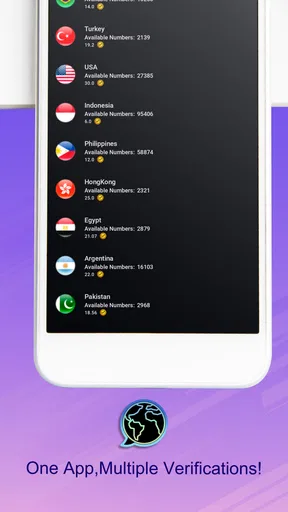
The real magic happens when you choose your virtual number. You can select from a variety of regions and countries, which is fantastic if you’re handling international clients or just want to keep things local but anonymous. The app provides a wide selection of numbers, which is a huge plus in my book.
Features that Stand Out
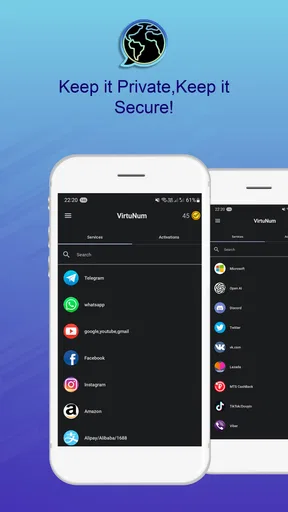
One of the standout features of VirtuNum is its flexibility. You can use your virtual number for calls, texts, and even voicemails. It’s like having an extra SIM card without the hassle of swapping physical cards. This is a game changer if you’re running a business or just want to keep your personal life separate from work.
Another highlight is the app’s seamless integration with other communication tools. It supports popular messaging apps, allowing you to maintain your communication flow without any hiccups. Plus, the call quality is impressive, almost as if you were using your actual phone number.
For those concerned about security, VirtuNum provides end-to-end encryption, ensuring that your conversations remain private. This feature gives an additional layer of comfort, knowing that your data is safe from prying eyes.
User Experience
Now, let's talk about the overall user experience. As someone who values straightforward functionality, I found VirtuNum to be refreshingly easy to use. The interface is minimalistic, yet packed with all the essential features you might need. It’s designed to make your virtual number experience as smooth as possible without overwhelming you with unnecessary bells and whistles.
The app also allows customization options for your caller ID, which is a neat touch. Whether you’re a freelancer, a small business owner, or just someone who values privacy, this feature is incredibly useful. You can tweak settings to ensure that your virtual number appears just as you want it to when making calls or sending texts.
Reading, touch, and sensory comfort
A clean interface can make routine tasks easier to follow, especially when you are switching between a signup page and an SMS app. I find that a minimal layout is most helpful when I have a clear goal, such as locating a code, rather than when I need detailed guidance. If you prefer large text, strong contrast, screen-reader support, or particular touch targets, I would check how the app behaves with your device’s accessibility settings before depending on it for an important login.
Verification is often a time-sensitive task, so sensory context matters too. A notification can be missed in a noisy place, while sound alerts may be unwelcome in a quiet room. I’d keep the destination signup open and check the message screen directly if the code is important, rather than assuming an alert will be noticeable. That simple habit can help whether you have hearing or vision needs, or are just working in a distracting environment.
Using it on the move—and knowing when not to
Imagine you’re at a café and need to finish creating an account before a meeting. You can use a separate number rather than putting your personal one into another signup, but you still need enough time and a reliable connection to move between the service and VirtuNum. If you’re rushing, have limited data, or cannot comfortably switch between screens, using your regular number may be the less stressful choice. Convenience is not worth missing a deadline or locking yourself out of an account.
I’d also be cautious about using a number for sensitive accounts where losing access would be costly. A virtual number may suit a one-off, low-risk verification better than a financial account, a primary email account, or anything that controls access to other services. For those, I would prioritize a recovery method I can maintain and verify over the added separation of a secondary number.
Practical limits and account housekeeping
The key trade-off is that a virtual number is not automatically anonymous, permanent, or accepted everywhere. Treat it as a way to separate contact details, not as a guarantee that a platform cannot connect activity to you. I’d avoid putting the number on public profiles unless I intend to receive ongoing contact there, and I’d keep track of which accounts depend on it. If I stop using the number, I’d review those accounts first and change their recovery details where possible.
VirtuNum is free to install, and its age rating is Everyone. The app has a 4.4 average from around 635,000 ratings, with more than 5 million installs. Optional in-app purchases range from $0.99 to $11.99 per item, so I would check the current purchase screen before choosing a number or relying on a longer-term setup. The existence of a free download should not be confused with every use being free.
The app was released on August 12, 2023, and its current version is 1.6.9. It requires Android 6.0 or later on Android devices. Those details are useful if you are checking compatibility on an older phone; if you use iOS, I’d confirm the app’s requirements on your device’s store page before planning around it.
Pricing and Plans
When it comes to pricing, VirtuNum offers a variety of plans to suit different needs. Whether you’re looking for a short-term solution or a long-term setup, there’s likely a plan that fits your budget. While some might find the premium plans a bit pricey, the value provided, especially for business users, is well worth it.
Furthermore, the app offers a free trial period, which is perfect for testing the waters before committing to a subscription. This trial period gives you ample time to explore the features and see if it’s the right fit for your needs.
My inclusive take
I can see VirtuNum being useful for people who are comfortable moving between communication apps and want a separate number for selected tasks. The straightforward presentation may help users who prefer a focused screen, while the need to select a number, monitor incoming messages, and maintain account recovery details still asks for attention. If navigating multiple screens is difficult for you, test the complete signup process with a low-stakes service first, rather than finding out during an urgent login.
People who need a dependable, long-term contact line, need extensive accessibility controls, or cannot risk a platform rejecting a virtual number may be better served by their usual mobile number or a second SIM. I would make the decision based on the consequences of losing access, not just the appeal of keeping a personal number private. That is the clearest way to tell whether this app fits your circumstances.
Final Thoughts
In conclusion, VirtuNum - Virtual Number is a solid choice for anyone looking to maintain privacy without sacrificing connectivity. Its user-friendly design, robust feature set, and reliable performance make it a standout app in the virtual number space.
If you’re tired of juggling multiple phones or simply want to keep your personal number private, give VirtuNum a try. It could be the solution you’ve been searching for. Check it out on your respective app store and see how it can change the way you communicate.
Pros
- Easy setup and user-friendly interface.
- Affordable pricing for virtual numbers.
- Supports multiple countries and regions.
- Reliable call quality and connectivity.
- Seamless integration with other apps.
Cons
- Limited customer support options.
- Some features require in-app purchases.
- Occasional delays in SMS delivery.
- App can be resource-intensive on devices.
- Lacks customization options for numbers.
FAQs for VirtuNum - Virtual Number
What is VirtuNum - Virtual Number?
VirtuNum - Virtual Number is an app that allows users to generate virtual phone numbers for secure and private communication. These numbers can be used for various purposes such as online registrations, business communications, or maintaining privacy when interacting with unknown parties.
How does VirtuNum ensure the security of my data?
VirtuNum prioritizes user privacy and security by employing advanced encryption methods to safeguard your data. The app ensures that all communications made through its platform are encrypted, minimizing the risk of data breaches and unauthorized access.
Can I use VirtuNum for international calls?
Yes, VirtuNum supports international calling, allowing users to connect globally without incurring high charges. The app offers competitive rates for international calls, making it a cost-effective solution for users who need to maintain contact across borders.
Is there a limit to how many virtual numbers I can have?
VirtuNum offers flexibility in the number of virtual numbers you can acquire. While basic plans may have a limit, premium subscriptions often allow users to generate multiple numbers, catering to both personal and professional needs. Check their pricing plans for specific details.
What platforms is VirtuNum available on?
VirtuNum is available on both Android and iOS platforms. Users can download the app from the Google Play Store or the Apple App Store, ensuring accessibility across a wide range of devices for seamless communication wherever you are.


